
Download puzzle & solution
Share puzzle
Our puzzles are completely free. Please support this website by recommending it to your friends and family. Thank you!
New puzzle
Mosaic
Mosaic is a picture logic puzzle where you determine each grid cell as black or empty. The numbers are located directly in the grid and indicate how many black cells are in their immediate surroundings. When all clues are satisfied, a pixel image emerges from the black cells.
The same basic mechanism is also published under the name Fill-a-Pix. This tutorial covers the black-and-white variant: a black cell belongs to the image, and a cell marked with x remains safely empty.
Basic Rules
- Each number counts the black cells in its own cell and in all adjacent cells horizontally, vertically, or diagonally.
- Within a hint, this encompasses an area of at most nine cells. At the edge, it is six, and in a corner, four.
- The cell with the number is included in the count. However, a number does not pre-determine whether its own cell is black or empty.
- A cell can belong to multiple hint areas and must satisfy all these hints simultaneously.
- Cells without a number have no additional special rule. They are also determined by neighboring numbers.
- The puzzle is solved when every cell is safely black or empty, and each visible number is exactly correct.
Strategies for Solving
Start with extreme clues: a 0 makes its entire area empty. A number equal to its area makes every cell within it black. Then work with remaining numbers: if the needed number has already been reached, all remaining cells are empty; if it matches the number of open cells, all open cells are black.
If a single hint remains ambiguous, compare two overlapping areas. They often share almost all cells. The difference of the hint numbers reveals what must happen in the small, non-overlapping part.
The following eight images use the same clearly solvable grid. They show selected, progressive learning steps. Simple repetitions are included between later images so that each illustration explains a new idea rather than just busywork.
1. An Edge Number Reaches Its Maximum
The 6 in row 1, column 4 is at the top edge. Its area includes only the six cells in rows 1 and 2 and columns 3 to 5. Since the hint equals the size of its entire area, all six cells must be black.
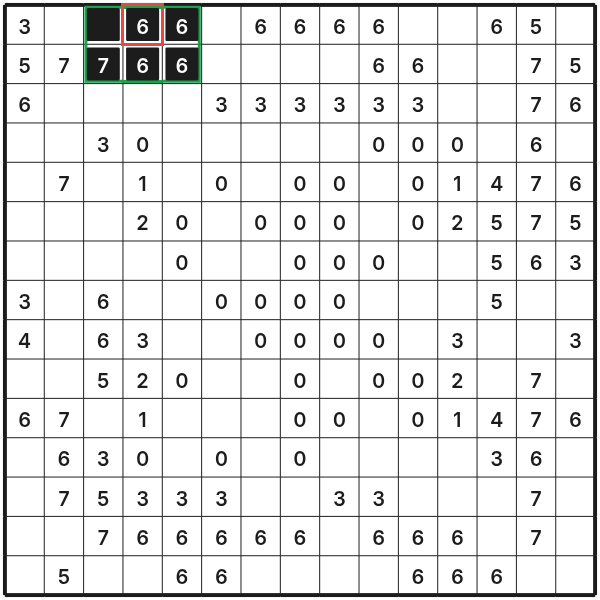
The green-marked area is fully determined. At the top edge, 6 is the largest possible clue; in a corner, a 4 would have the same effect.
Check at the start not only for 0 and 9. Edges and corners have smaller areas and thus different maximum values.
2. The Remaining Number Fills All Open Cells
Now consider the neighboring 6 in row 1, column 5. Four cells of its area are already black from the first step. Exactly two cells are still undecided, and the hint needs two more black cells.
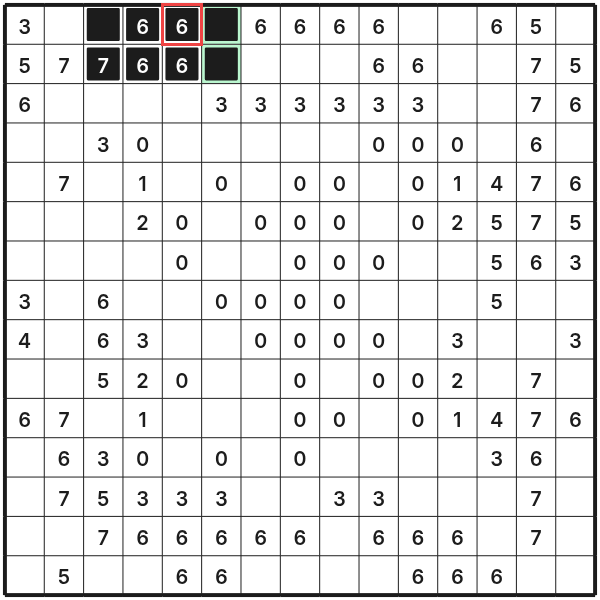
Both open cells in column 6 are marked black. Generally, if the remaining number matches the count of open cells, all open cells in the area are black.
This calculation is more reliable than just looking at the original number because already set black cells are immediately considered.
3. Overlapping Hints with Different Sums
The 3 in the top left corner counts the four cells in the first two rows and columns. The 5 directly below counts the same four cells plus the two cells in row 3, column 1, and column 2.
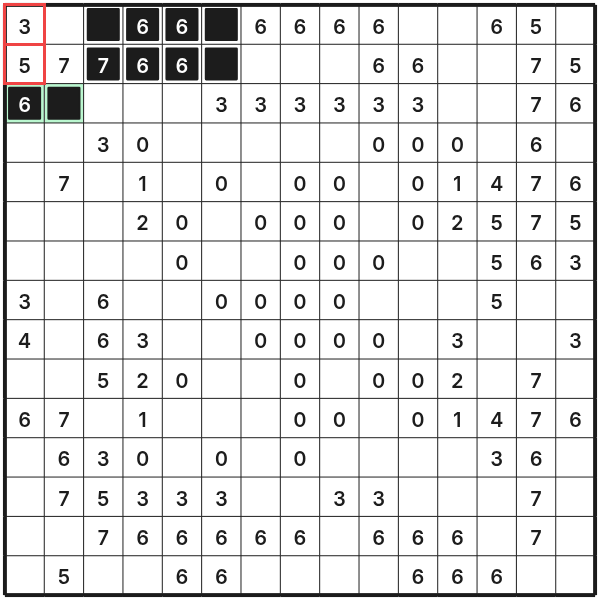
The larger hint requires exactly two more black cells. Its area has exactly two additional cells compared to the smaller one. Therefore, both extra cells must be black, regardless of how the four shared cells are later distributed.
In such comparisons, you do not need to know the shared cells individually. Only the difference of the sums and the non-shared part are critical.
4. An Satisfied Hint Clears the Rest
Following the obvious continuations at the top edge, the 6 in row 2, column 4 already has six black neighboring cells. Besides, there are still three undecided cells in row 3 within its area.
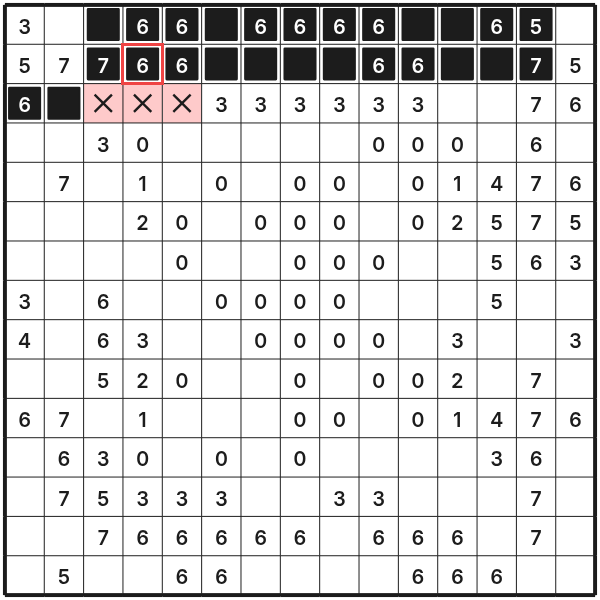
All six required black cells are already present. Any additional black cell would exceed the hint, so the three marked red are safely empty.
Mark such cells consistently with x. Confirmed empty cells are active information: they reduce neighboring hint areas' open cells.
5. Known Empty Cells Force the Rest
In the area of the 7 in row 2, column 3, five cells are now black and two are safely empty. Only the cells in row 1, column 2, and row 2, column 2 remain open. Two black cells are exactly missing for the required sum.
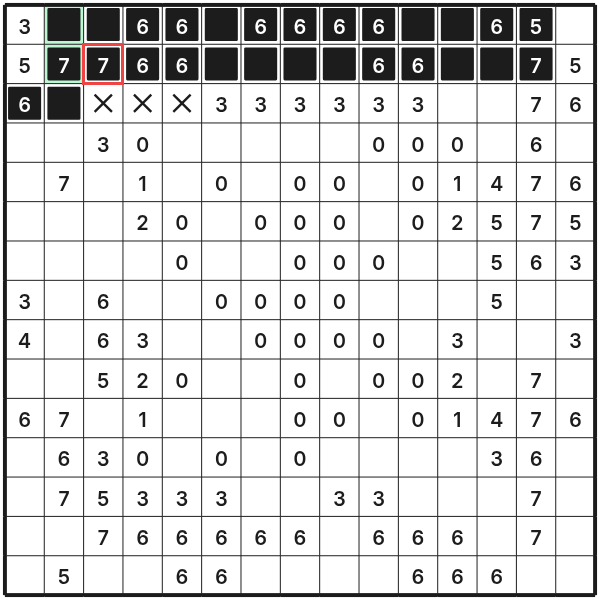
Both open cells must be black. If only one were empty, the area could contain at most six black cells, and the 7 would no longer be reachable.
This step is the reverse of the previous one: there, the quota was already met; here, all remaining possibilities must be used.
6. A Zero Clears Its Entire Area
The 0 in row 4, column 4 counts its entire 3×3 area. Some cells are already empty due to earlier hints; the five marked red were still open.
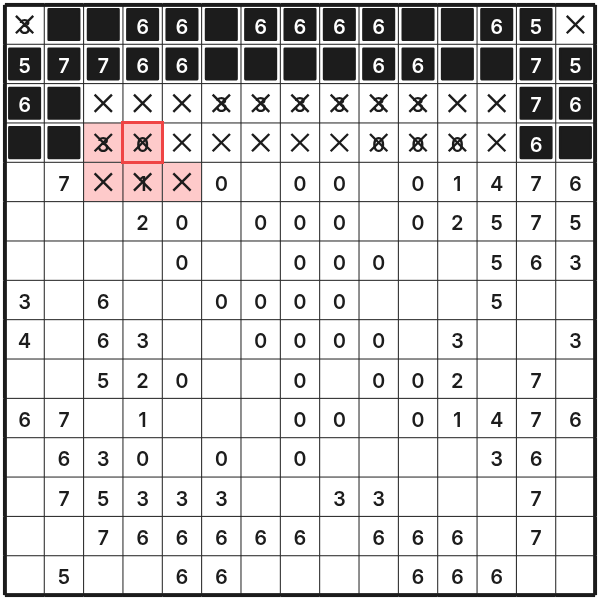
A zero permits no black cells. Therefore, the five remaining cells are also marked with x, and the entire zero area is finished.
Zeros often produce large connected empty areas. Immediately examine the hints at the edges of these areas, as the remaining open cells are heavily restricted.
7. Same Remaining Number in Overlapping Areas
Later, the 7 in row 6, column 14 requires exactly one more black cell; only the two open cells directly below it are candidates. The 3 in row 7, column 15 also needs exactly one black cell. Its open area includes the same two cells plus the two cells in row 8, column 14 and column 15.
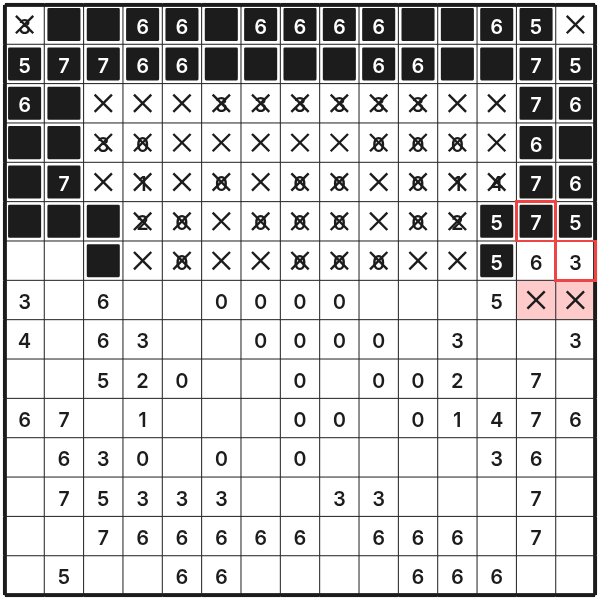
The missing black cell for both hints must come from the shared part. The two additional cells of the larger open area cannot be black and are marked empty.
This is an important comparison rule: if two nested residual areas need the same number of black cells, the non-shared part of the larger area is entirely empty.
8. The Last Cell Checks the Solution
After repeated application of these rules, only the cell in row 15, column 15 remains open. The 7 in row 14, column 14 already has seven black cells in its area.
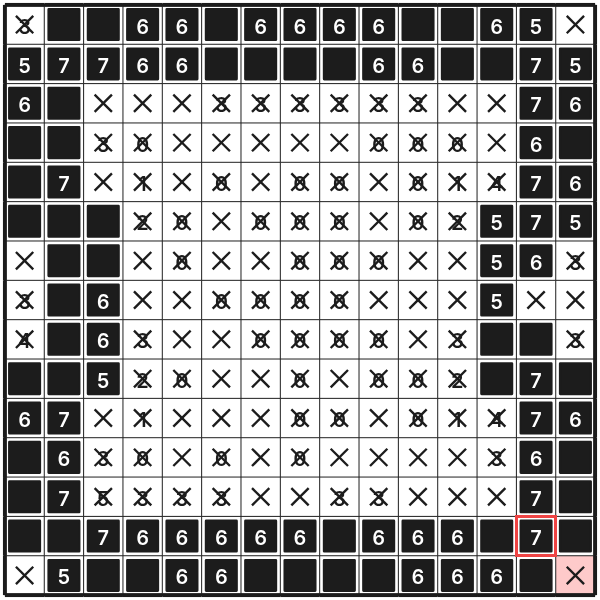
The last cell must be empty; otherwise, the sum would rise to eight. With that, every cell is decided, and all hints simultaneously match.
The completed black-and-white pattern also serves as a practical final check: recount all black cells in each hint area, including the hint cell itself.
Common Mistakes
- The number cell is not counted. It always belongs to its own hint area.
- Diagonally adjacent cells are overlooked. An inner hint considers all eight neighbors, not just the four orthogonal ones.
- For edge and corner hints, nine cells are mistakenly assumed. Outside the grid, there are no cells.
- A number cell is automatically left empty. Even a cell with a number can be black in the solution.
- Only black cells are marked. Without secure
xmarks, many residual numbers remain ambiguous. - The original number is compared with the number of open cells without subtracting already black cells.
- When two hints are involved, the entire areas are compared instead of cleanly separating shared and additional parts.
A Systematic Workflow
- Look for
0and maximum clues:9inside,6on the edge, and4in a corner. - Determine the remaining number for each touching hint: hint minus already black cells.
- If the remaining number is
0, mark all open cells of the area as empty. - If the remaining number equals the count of open cells, fill all these cells as black.
- Compare neighboring hints with heavily overlapping areas and examine the difference.
- Repeat the check after each entry across all affected hints.
- Finally, verify each number and ensure no cell remains undecided.
Summary
In Mosaic, each number is an exact sum over its own cell and the neighboring cells. The main tools are maximum clues, zeros, remaining numbers, and the comparison of overlapping areas. When you carefully mark black and empty cells and recount after each step, the hidden pixel image grows out of the grid without guesswork.